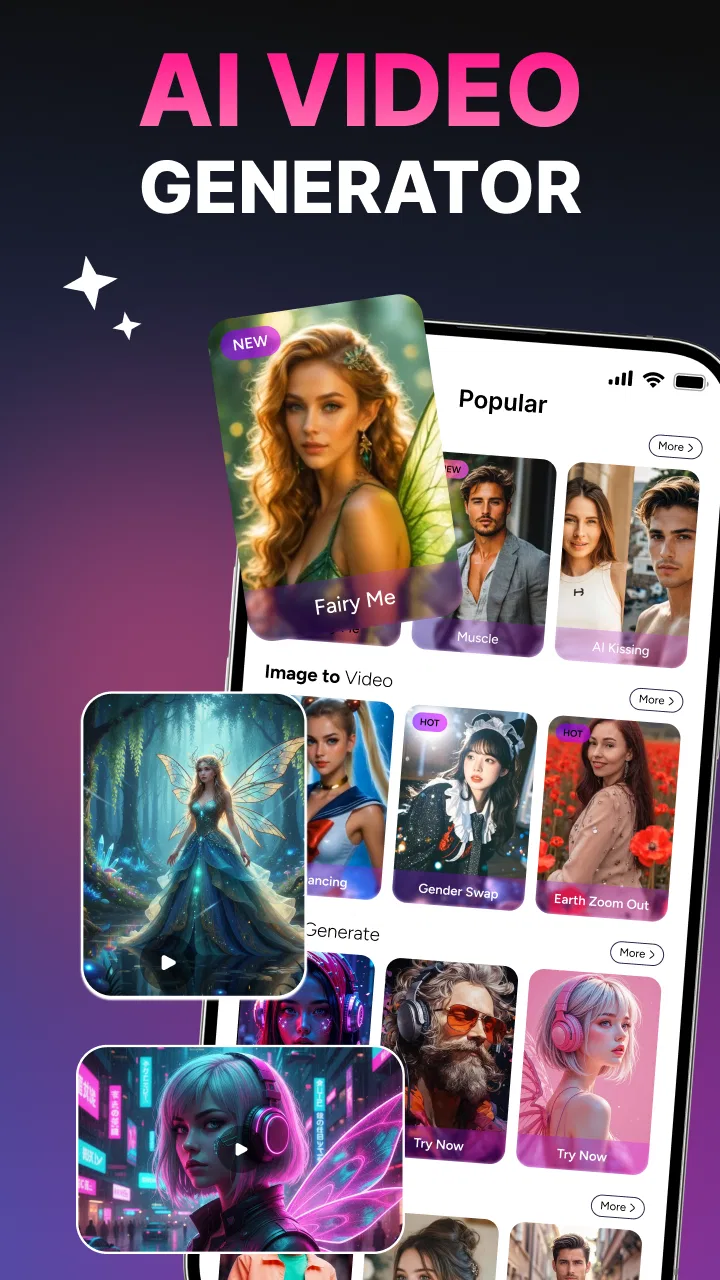
AI Video Generator
- 3.7
- Rating
- 500.00K
- Installs
- Free
- Price

 Analysis by App-foxy
When I first opened AI Video Generator, I expected a simple text-to-video experiment, but it is better understood as a compact creative toolbox. It brings together AI video creation, image generation, background removal, and face swapping in one mobile app. That combination makes it interesting for quick social posts, playful edits, and visual ideas that would normally require several separate tools.
My recommendation depends less on whether you want “AI video” in general and more on how you work. If you like trying several visual effects from your phone and do not want to learn a full desktop editor, this app has an appealing starting point. If you need precise timelines, dependable export control, or a serious production workflow, I would look at a conventional video editor instead. The important choice is whether convenience matters more to you than detailed control.
What to consider before choosing it
The app comes from Butter Soft and sits in the video players and editors category, although its identity is closer to an AI creation studio than to a traditional editor. Its store summary focuses on creating AI videos, generating images, removing backgrounds, and swapping faces. In practice, that means the most useful question is not “Can it replace my editor?” but “Can it help me make a visual result quickly?”
You May Also Like

 Blood Strike: 2.5 Anniversary
Blood Strike’s Loadouts Turn Every Drop Into a Tactical Gamble
A close look at Blood Strike’s custom loadouts: how fast access to signature weapons reshapes its battle royale rhythm, rewards preparation, and narrows the gap between fights.

 Pandora - Music & Podcasts
Pandora’s Music Is Easy to Start, but Harder to Recover
Pandora’s strength is its low-effort path from a seed to a station. Its weak spot is how much confidence it asks you to place in connection, setup, and quiet recovery.

 8 Ball Pool
 Is Built on Rivalries, Rematches, and Routine
A close look at the rivalries, rematches, shared routines, and unanswered safety questions that turn a quick pool match into a persistent mobile community.

 Samsung Music
’s Quiet Strength Is Playing What You Already Own
Its reach comes less from spectacle than from dependable access to a personal library. That simplicity is both the app’s strongest retention engine and its ceiling.

 AccuWeather: Weather Radar
AccuWeather Review: A Quick, Clear Forecast for Everyday Decisions
For everyday plans, the best forecast is the one you can understand quickly. AccuWeather makes rain timing, radar, and local conditions easy to act on, with a few trade-offs.

 Hill Climb Racing
Why Hill Climb Racing Still Turns Crashes Into One More Run
A tiny car, a bumpy hill and one more upgrade: Hill Climb Racing keeps resurfacing because its simple chaos makes every near-miss feel personal.
More From Our News Desk
View All News


I would judge it using four criteria. First, consider the kind of input you have. Someone starting with a short idea, a photo, or a subject to isolate will get more from this app than someone who already has a carefully organized collection of clips. Second, think about repeatability. AI effects can be fun and fast, but they may not always produce the same result when you try again. Third, decide how much manual editing you need after generation. Finally, look at your tolerance for paid extras, because the app is free to install while in-app purchases range from $0.99 to $189.99 per item.
That last point deserves attention before you build a regular workflow around it. A free download is useful for testing the experience, but it does not automatically mean every creative path is free. I would begin with a small, low-pressure project rather than importing a large personal archive or planning a paid campaign around the app. This lets you understand which tools are immediately usable and which steps might lead to an optional purchase.
The age rating is Everyone, which makes the app approachable for a broad audience. That does not remove the need for good judgment, especially with face swapping. I would only use images when I have permission from the people shown, and I would avoid presenting an altered face as if it were an authentic recording. The technology may be playful, but the way an image is shared still matters.
My first practical test
For a fair test, I would not begin with an elaborate story. I would choose one clear photo, one simple visual idea, and one ordinary use case such as making a short birthday greeting or turning a travel image into a more animated post. This approach reveals whether the app’s creative tools are understandable without burying the result under too many effects.
I also recommend keeping the first project visually simple. A clean subject against a reasonably uncluttered background gives the background remover less work to do, while a well-lit face is a sensible starting point for face-swapping experiments. These are not guarantees of perfect output, but they reduce avoidable problems and make it easier to tell whether the app itself suits you.
One useful habit is to save the original image separately before changing it. AI tools encourage experimentation, and it is easy to forget which version was the source. Keeping an untouched copy means you can try a different background or visual direction without losing the starting point. This is a small workflow improvement, but it makes a mobile creative app feel much less disposable.
Where the combined toolbox helps
The strongest idea here is the combination of tools. A person can begin with an image, remove its background, generate another visual, and explore a video concept without constantly switching between unrelated applications. Even if each tool is not as deep as a specialist alternative, fewer app changes can make a big difference when the goal is a quick result rather than a polished production.
For example, imagine I am preparing a product teaser for a small online shop. I might start by isolating an object from a photo, create a cleaner visual setting, and then turn the concept into a short AI-assisted video. I would still inspect the result carefully, but the app could help me move from a rough idea to something shareable before I decide whether it deserves a more advanced edit.
The same workflow can suit a teacher preparing a visual prompt, a parent making a playful family greeting, or a creator testing several concepts for a social post. The value is not necessarily in producing a finished commercial film. It is in reducing the distance between “I have an idea” and “I can show someone what I mean.”
Another non-obvious strength is creative branching. Instead of committing to one complicated project, I can make several small versions: one image with a removed background, another with a different generated look, and a short video based on the most promising direction. This is a better use of an AI app than repeatedly polishing a weak first attempt. The app is most helpful as an idea filter.
What the current version means for everyday use
The current version is 1.3.5, and the app requires Android 7.0 or later. That gives it a relatively accessible technical starting point for Android users with older supported devices. Still, compatibility does not tell me how comfortable a particular phone will feel during image or video creation. AI-related tasks can be more demanding than ordinary photo browsing, so I would leave free storage available and avoid judging the experience from a device that is already struggling with basic apps.
In a normal day, I can see myself using it in short sessions rather than sitting down for a full editing afternoon. I might create a quick visual during a commute, test a face-swap idea for a private joke, or remove a background from an image before sending it to someone. That mobile-first rhythm is important: the app makes more sense when speed and experimentation are the priority.
It is also worth separating “creating” from “finishing.” I would use this app to explore a concept, generate a starting asset, or make a casual share. For captions, exact timing, layered audio, detailed transitions, and brand consistency, I would move the result into a conventional editor if the project required those things. Treating the app as the first stage rather than the entire pipeline prevents disappointment.
Where it wins, where alternatives fit, and the real switching cost
I find this app most compelling when I have an idea but no finished footage: it can help me explore an image, a background cutout, a face effect, or an AI-made video in one place. The convenience is real, but it comes with a trade-off—specialist tools and conventional editors can offer more control. The key question is how much that convenience matters in your own workflow.
Why I would choose it over a standard editor
A traditional mobile editor usually begins with footage that already exists. You trim it, arrange it, add text, adjust the sound, and export. AI Video Generator begins earlier in the creative process, when you may not have footage at all. That makes it more attractive for someone who wants to invent a visual from a prompt or transform a still image into something more expressive.
It also has an advantage for people who dislike tool-hopping. A separate background-removal app, an image generator, a face-effect tool, and a video editor can create a messy workflow. Here, those ideas live under one roof. The trade-off is depth: a focused specialist may offer more precise controls for its one job, while this app prioritizes variety and accessibility.
I would especially favor it for short-form experimentation. A creator who wants to test a visual hook before investing time in a larger edit can use the app as a sketchbook. That is a different role from a professional editor, and it is where the product feels most convincing to me.
When a different category is better
I would choose a conventional timeline editor when the footage is already recorded and the main task is accuracy. If I need to synchronize several clips, make exact cuts, balance a sequence, or keep a recognizable visual identity across many posts, manual editing is usually the safer choice. AI generation can add novelty, but novelty is not the same as control.
I would also consider a dedicated image editor when background removal is the only feature I need. Installing a broad AI toolbox for one repeated task may not be worthwhile if a specialist gives me a faster, more predictable routine. The same applies to face swapping: if that is my central activity, a purpose-built tool may be easier to evaluate because its workflow is focused around that single effect.
For people who need dependable results for clients, I would be cautious about making generated output the final step. I would inspect faces, edges, object boundaries, and any details that could look unnatural. A result that seems amusing on a private screen may need much more review before publication. The app can help with ideation, but responsibility for the finished image remains with the person sharing it.
How the price changes the decision
Because the app is free, trying it is straightforward. The more important question is how comfortable I am with the in-app purchase structure. The listed purchase range stretches from $0.99 to $189.99 per item, so I would not assume that occasional use and heavy use will feel equally economical. Before paying, I would identify the exact feature or output I want and decide whether it saves enough time to justify the expense.
My practical advice is to treat the first session as an evaluation, not as the beginning of a subscription-like habit. Make a small project, inspect the workflow, and note where the app asks for payment. If the free experience already fits your needs, that is a positive sign. If the useful part only appears after repeated purchases, a different editor or a more focused app may be the better long-term choice.
The cost of switching away is relatively low if you use the app for casual experiments, because the work is not necessarily built around a complex project structure. However, switching becomes more annoying if you have created many concepts inside the app and depend on its particular AI effects. I would therefore keep important source photos and exported results in my own folders rather than treating the app as the only place where my creative material exists.
Questions I would ask before installing
Will it work for a complete beginner? I think so, especially if the goal is to try one tool at a time. The broad feature set may feel busy, but starting with background removal or a single image gives a gentler introduction than attempting a full AI video immediately.
Can it replace my usual editor? I would say no for detailed, repeatable editing. It can complement one by producing ideas and assets, but people who depend on precise sequencing should keep a proper timeline-based editor in their workflow.
Is it useful without spending money? It is worth testing as a free app, but I would explore the available workflow before assuming that every desired creation path is included at no cost. The purchase range is broad enough that budget-conscious users should make this check early.
Is face swapping suitable for public posts? It can be suitable when everyone involved has agreed and the result is clearly presented as an edit. I would avoid using it to mislead viewers, impersonate someone, or create embarrassing content. The app makes manipulation easy; that makes responsible use more important, not less.
Who should skip it? I would skip it if I wanted a professional editor with deep manual controls, if I needed a highly predictable output every time, or if I only wanted one narrow function and preferred a specialist. I would also skip it if I found the purchase prompts distracting during casual experimentation.
My recommendation after weighing the trade-offs
The app has a clear place for curious mobile creators. It is free to install, rated 3.7 on average from around 1.3 thousand ratings, and has passed 500 thousand installs, so it has attracted a meaningful audience without being positioned as a specialist production suite. Those figures suggest a product people are willing to try, while the middling average is a reminder to keep expectations realistic rather than assuming every generated result will be excellent.
I would recommend it to someone who wants a quick way to explore AI visuals, especially when the project starts with an idea instead of finished video footage. Its mix of generation, image work, background removal, and face effects is more useful than a single gimmick because it supports several stages of a casual creative workflow.
I would not recommend making it the only editor for important work. Use it as a fast concept studio, a source of playful assets, or a way to test a visual direction. Then move successful results into a more controlled tool when timing, consistency, or professional presentation matters.
My final advice is simple: install it if you enjoy experimenting and can accept some uncertainty in AI output and purchase boundaries. Start with one photo, preserve the original, test a small project, and judge the result by whether it saves you time rather than by how impressive the feature list sounds. For that kind of user, AI Video Generator is a convenient creative playground, not a complete replacement for careful editing.
FAQs for AI Video Generator
01What is AI Video Generator and what can it do?
AI Video Generator is a tool that creates videos from text prompts, images, or other user-provided instructions. During testing, it was useful for turning simple ideas into short visual clips, social media content, presentations, and promotional material. Depending on the version and subscription plan, it may also provide templates, automatic captions, music, voiceovers, transitions, and basic editing controls.
02Is AI Video Generator free to download and use?
The application may be free to download, but access to advanced features is often limited by credits, watermarks, export restrictions, or a paid subscription. Before creating several videos, users should check the current pricing, trial conditions, and renewal terms in the app store. Free access can be suitable for testing, while frequent generation may require a premium plan.
03Can AI Video Generator create videos from text or photos?
Yes, AI Video Generator generally supports text-to-video and image-to-video creation, although the available tools can vary between Android, iOS, and subscription levels. A detailed prompt usually produces more useful results than a short request. Users can describe the subject, style, movement, duration, colors, and format, then adjust the result or regenerate it when the first version does not match their expectations.
04Does AI Video Generator produce professional-quality videos?
The app can produce attractive and creative clips quickly, but the final quality depends on the prompt, source image, selected model, video length, and available export settings. It is particularly convenient for social posts, concept videos, advertisements, and experiments. However, users may notice unnatural movements, inconsistent faces, incorrect text, or visual details that still require manual editing before professional publication.
05Are there privacy or copyright concerns when using AI Video Generator?
Users should review the app’s privacy policy before uploading personal photos, confidential material, or recognizable people. Generated content may also be subject to platform-specific ownership and commercial-use rules. It is important to use images, music, voices, and logos that you own or are licensed to use. Avoid uploading sensitive information, and verify the app’s terms before using generated videos for business or paid advertising.
Pros
- Creates videos quickly from simple text prompts.
- Offers useful templates for social media content.
- Can reduce the need for advanced video-editing skills.
- Helps generate fresh visual ideas for projects.
- Convenient for producing short videos on mobile devices.
Cons
- Generated scenes may contain visual or text inconsistencies.
- Results can vary significantly between similar prompts.
- Advanced features may require a paid subscription.
- Export quality and length may be limited on free plans.
- Processing can be slow when servers are busy.

AI Video Generator
Gallery